1 October 2026
TestAS Figure Sequences: the Rules, a Method and Worked Examples
Figure Sequences is the first subtest of the digital TestAS Core Module, and for many applicants it is the least familiar one. There is no language to read and no formula to recall: you see a row of small grids, figures move and change from one grid to the next, and you decide what the next two grids look like.
The good news is that the task follows a short, fixed list of rules, which g.a.s.t. publishes in its preparation material. Once you know the rules and work through each task in the same order, most sequences become quick to solve. This guide explains the format, the rules, a method you can use in the exam and three worked examples drawn for this article.
The format at a glance
| Figure Sequences (digital TestAS) | |
|---|---|
| Part of | Core Module, taken by everyone |
| Number of tasks | 20 |
| Working time | 25 minutes (about 75 seconds per task) |
| What you see | A series of matrices (4 × 4 grids) with one or more figures |
| What you do | Decide what the next two matrices look like |
| Answer format | One choice for each of the two missing matrices |
| Notes | Not allowed |
The Core Module has three subtests of 25 minutes each: Figure Sequences, Mathematical Equations and Latin Squares. If you want to know how the results turn into your TestAS Score, read how TestAS scoring works.
The official rules
The preparation material for the digital TestAS lists what figures can and cannot do. These are the only kinds of change you need to look for:
- Colour. A figure can change its colour.
- Rotation. A figure can rotate around its own axis.
- Movement. A figure can move vertically, horizontally or diagonally within the matrix. A figure that moves diagonally does not switch to another type of movement.
- Growing steps (x + 1). Movement, colour or orientation can change by a growing amount: one step, then two steps, then three steps, and so on.
- No disappearing, no overlapping. Figures stay visible and never share a field.
- No leaving the grid. At the outer boundary a figure either bounces off and comes back, or moves along the boundary.
Several figures can be in one matrix, and each follows its own rule. That is what makes the harder tasks harder: not stranger rules, but more figures to track at once.
A method for every task
Because you cannot take notes, a fixed routine saves time and prevents mistakes.
- Count the figures. Decide how many separate figures you need to track.
- Take one figure at a time. Follow it from the first matrix to the last and ask three questions: Does it move? Does it rotate? Does it change colour?
- Measure the change. For movement, count fields per step. For rotation, estimate the angle per step. Check whether the change is constant or grows (x + 1).
- Check the edge. If the figure reaches the boundary, look at the options: does it bounce back or continue along the edge?
- Predict matrix 5, then matrix 6. Apply the rule once for the first missing matrix and once more for the second. Many wrong options are correct for the first step but not the second.
- Eliminate, then choose. Drop every option that breaks one of your rules. If two remain, check the figure you are least sure about.
A typical trap: an option shows the right position but the wrong colour, or the right colour but a figure rotated one step too far. Always check all three properties before you click.
Worked example 1: a straight movement that meets the edge
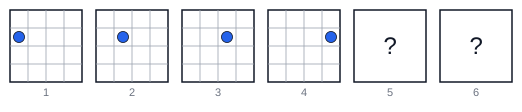
Step 1. There is one figure, a blue circle.
Step 2. It moves one field to the right in each matrix and does not rotate or change colour.
Step 3. In matrix 4 it has reached the right edge. It cannot leave the grid, so it either bounces off or moves along the boundary. In this example the options show the bounce, so the circle moves back to the left, still one field per step.
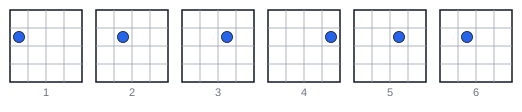
Answer: matrix 5 shows the circle in the third field of the row, matrix 6 in the second field.
Worked example 2: a rotation that grows (x + 1)
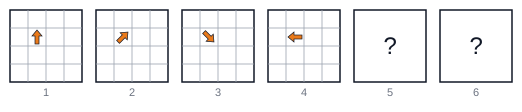
Step 1. One figure, an orange arrow, and it never moves. So the rule must be in the rotation (the colour stays the same).
Step 2. Measure the turns clockwise: from up to up-right is 45 degrees, from up-right to down-right is 90 degrees, and from down-right to left is 135 degrees.
Step 3. The turn grows by 45 degrees each time. The next turns are therefore 180 degrees and then 225 degrees.
Step 4. From left, a turn of 180 degrees gives right. From right, a further 225 degrees clockwise gives up-left.
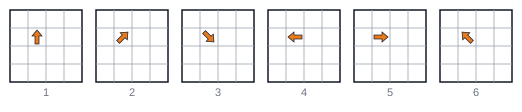
Answer: matrix 5 shows the arrow pointing right, matrix 6 pointing up-left. If you had assumed a constant turn, you would have chosen a wrong option for both matrices.
Worked example 3: two figures with different rules
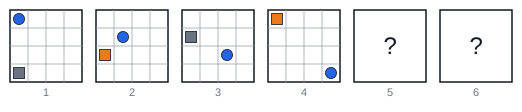
Step 1. Two figures: a blue circle and a square.
Step 2, circle. The circle moves one field diagonally down and to the right in each matrix. In matrix 4 it is in the bottom-right corner. It cannot leave the grid, and a diagonal mover keeps moving diagonally, so it bounces back along the same diagonal.
Step 3, square. The square moves one field up the left edge in each matrix and alternates between grey and orange. In matrix 4 it has reached the top-left corner, so it continues along the boundary to the right.
Step 4. Check for overlaps: the two figures never share a field, so the prediction is allowed.
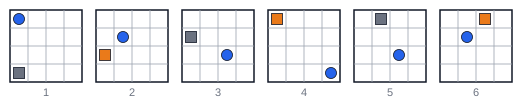
Answer: in matrix 5 the circle is one field back up the diagonal and the square, now grey, is in the second field of the top row. In matrix 6 the circle moves one more field up the diagonal and the square, now orange, moves one more field to the right.
Pacing: 75 seconds per task
Twenty tasks in 25 minutes leaves about 75 seconds each. Tasks with one figure are usually solved much faster, which buys time for tasks with three or four figures. A simple plan:
| Situation | What to do |
|---|---|
| One or two figures, rule clear | Answer, check colour and rotation once, move on |
| Three or four figures | Solve figure by figure; eliminate options after each figure |
| No rule found after about 90 seconds | Eliminate what you can, guess, move on |
Guessing is better than leaving a task: the official material explicitly asks you to guess if you do not know an answer.
How to practise
Figure Sequences improves quickly with practice because the rule list is short. Start with single figures until you can read movement, rotation and colour at a glance, then move to two and three figures, then to growing steps and edge cases. Practise without paper, as in the exam.
You can try generated Figure Sequences tasks for free on our Figure Sequences practice page, with the same 4 × 4 grids and the rules described above. For a full plan that fits the three core subtests and your subject module into your preparation time, see the 8-week TestAS study plan.
Summary
- 20 tasks, 25 minutes, no notes; you choose the next two matrices.
- Figures change colour, rotate or move (straight or diagonal), sometimes by growing steps.
- Figures never leave the grid, disappear or overlap; at the edge they bounce or follow the boundary.
- Solve figure by figure, predict both matrices, then eliminate options.
Sources: Structure of the digital TestAS and the Digital TestAS Preparatory Materials for Test Takers (g.a.s.t., as at April 2022), available from Preparing for the digital TestAS. The examples in this article were drawn by Kollego and are not official tasks.
Frequently asked questions
How many Figure Sequences tasks are in the digital TestAS?
The Core Module contains 20 Figure Sequences tasks, and you have 25 minutes for them. That is 75 seconds per task on average.
Do I have to find one missing matrix or two?
Two. Each task shows a series of matrices and asks what the next two matrices look like. You choose one option for each of the two missing positions.
Can I take notes or draw during the Figure Sequences subtest?
No. According to the official preparation material, you are not allowed to take notes in the exam, so you have to track the figures in your head.
What should I do if I cannot find the rule?
The official material asks you to guess if you do not know an answer. Eliminate any option that breaks a rule you are sure of, pick the most likely remaining one and move on so you keep time for the other tasks.
Can a figure leave the grid or disappear?
No. Figures cannot leave the matrix, disappear or overlap. At the outer boundary a figure either bounces off or moves along the boundary.
Is Figure Sequences the same in the paper-based TestAS?
No. This guide describes the digital TestAS, where the Core Module has Figure Sequences, Mathematical Equations and Latin Squares. The paper-based format has a different core test.
Related
Start practicing free
One diagnostic, a projected score, and your first unit. No card, no time limit on the free tier.
Start free, no card needed